

Automatic follow-up cadences
PeakSend automatically follows up with leads over multiple call attempts, rotating through different times of day until the lead converts, opts out, or reaches the maximum number of attempts. Once a lead enters the system, the cadence runs on its own.
Speed to lead
Section titled “Speed to lead”When a new lead comes in, the agent calls immediately. If the first attempt goes unanswered, an optional immediate callback places a second call right away, while the lead is likely still near their phone.
You can toggle immediate callback on or off in the Customizing section below.
Follow-up attempts
Section titled “Follow-up attempts”After the first call, the agent keeps reaching out with more time between each attempt. Early follow-ups happen within hours; later ones are spaced days apart.
The agent rotates through morning, afternoon, and evening windows in the contact’s timezone, so you’re not always calling at the same time.
What affects call timing
Section titled “What affects call timing”Several factors determine exactly when a call goes out:
- If you’ve configured custom business hours, calls only go out during those windows (unless you’ve enabled calling live leads after hours).
- All calls respect TCPA calling windows based on the contact’s timezone and state regulations.
- Calls won’t go out while an agent or account is paused. The cadence resumes when unpaused.
- When a large batch of leads enters the system at once, PeakSend spreads calls out to maintain consistent volume. Calls may go out later than the cadence timing suggests. Live leads are still prioritized.
After each call
Section titled “After each call”What happens next depends on how the call went:
- Do not call (DNC) or converted: the lead is removed from the cadence.
- Scheduled callback: if the lead asks to be called back at a specific time, the cadence pauses until then. For example, if a lead says “call me back tomorrow afternoon,” the agent skips the normal schedule and calls back the next afternoon instead.
- No answer or not converted: the lead stays in the cadence and gets the next follow-up as scheduled, until it reaches the maximum number of attempts.
Customizing
Section titled “Customizing”Open the script editor for your agent. The follow-up settings are in the right-hand column under Agent Details.
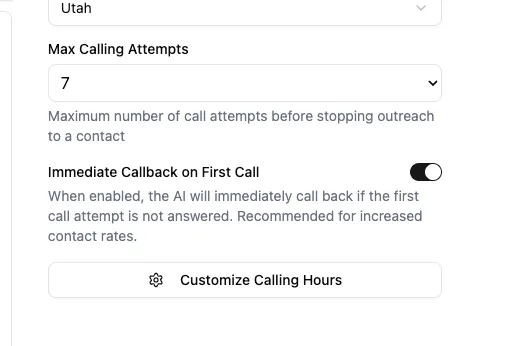
Max calling attempts sets how many times the agent tries to reach a lead before stopping. Options are 3, 7, or 12. The default is 7. Our internal contact rate data shows that it’s usually not worth it to try additional dial attempts after that.
Immediate callback on first call places a second call right away if the first attempt goes unanswered. Enabled by default.